
Recently, I realized I needed a series bible for all my books that involve Harp Security. I’m not sure how many details other authors can cram into their brains without bits and pieces getting confused, but I found that after three books, things were starting to get messy upstairs.
A series bible keeps track of a lot of information, but one thing that a lot of folks find hard to deal with is timelines and I’ve never found a satisfactory way to manage that in either a spreadsheet or in Scrivener, which is where the rest of the character and series information are stored.
Luckily, as the saying goes, there’s an app for that. Aeon Timeline. Honestly, there’s nothing like it that I’ve ever discovered. Here’s the timeline for all the Harp books so far.

Under the timeline itself, you can see various characters or organizations. When you create a new “entity,” you can either give it a start date, or you can set its age at the time of its first appearance. Harp Security, the organization, is important in the life of its founder, Nash Harper, before it actually exists. I knew when it was founded, so I set that as the start date, which is indicated on the timeline by a star. Then Aeon automatically populates its age at any other event I associate with it.
Solid dots indicate events in which the character is a participant (or, as I use it, primary character). Open dots indicate that the person was an observer (secondary character). Some of my characters, as you can see, I haven’t quite decided dates of birth for yet.
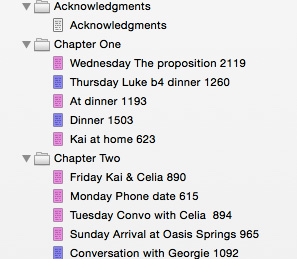 I track the days of individual books (most of which take place within the space of a few weeks) in Scrivener. After I made a character go to a government office on a Sunday, I realized I had to do something. It’s a good compromise, but once the book is done, I still have to move the big events to Aeon so they get tracked in case I need to reference them later.
I know not everyone’s a fan of Scrivener, so I thought I’d point out that you can do this same thing in Word by inserting a comment at the beginning of each scene when you are writing that tells you what day/time it is.
So there you have it. A VERY basic primer on keeping track of time when you’re writing a series.
Wow. Gonna check this out!
This is fantastic!
It really is. I’d be lost without it. 🙂
This looks amazing, so helpful, thanks!
Love the look of Aeon and am going to check it out as I’ve been using a calendar and it’s less than ideal. I’m also curious for more details of your system. When you say you track the days of events in Scrivener, is that what those 3 & 4 digit numbers are by your scenes? In what way do those relate to days? (You seem very organized by the way. Something to aspire to.)
Thanks for a great tip.
Mary Ann – the numbers are the number of words in the scene. The days are at the beginning of the scene. Sometimes, it takes several scenes to make up a day, sometimes just one. 🙂